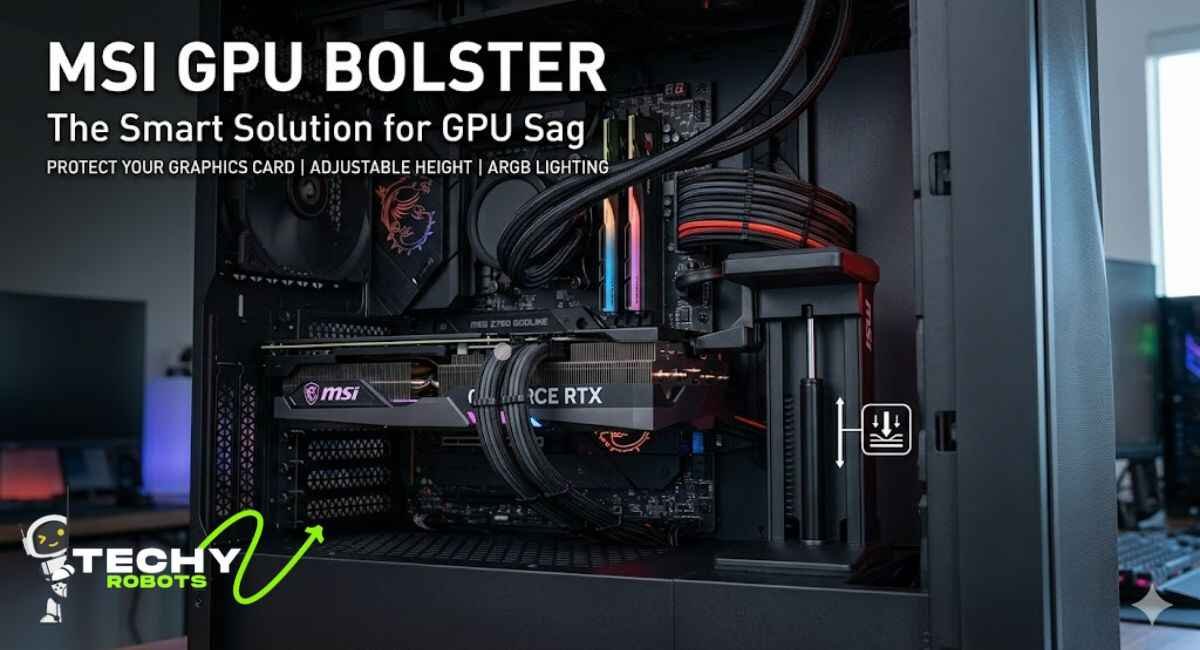
Modern graphics cards are getting ridiculously heavy. If you’ve ever looked inside your PC and noticed your GPU drooping toward the bottom of the case like it’s giving up on life, you’re not imagining things. GPU sag is a genuine problem, and it’s one that more PC builders are taking seriously these days. The MSI GPU bolster was designed specifically to tackle this issue, and it does it in a surprisingly elegant way.
Whether you’re rocking an RTX 4090, an MSI Gaming X Trio, or any other triple-fan beast, this guide breaks down everything you need to know about the MSI GPU bolster: what it is, how it works, why it matters, and whether it belongs in your build.
What Is a GPU Bolster and Why Does It Matter?
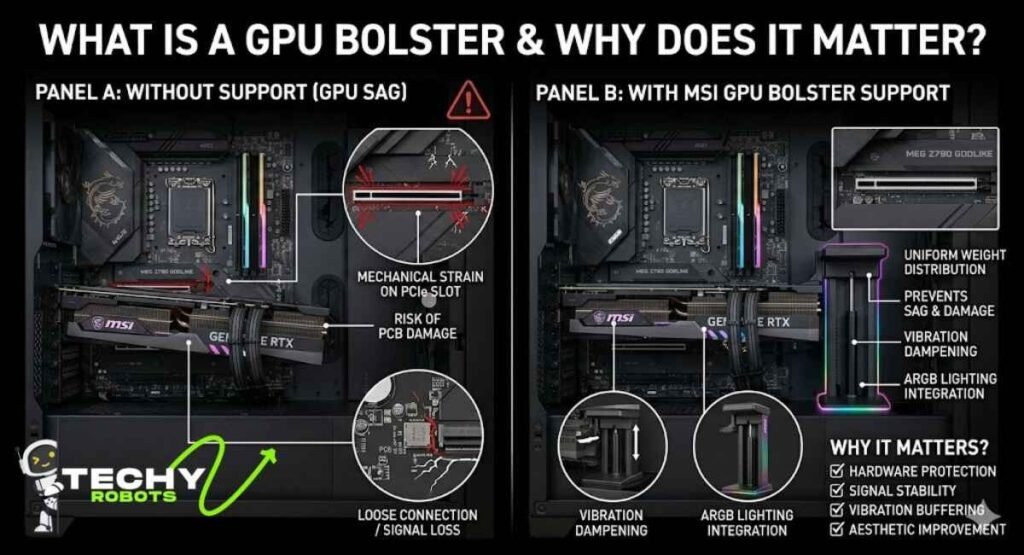
A GPU bolster, at its core, is a support system for your graphics card. It sits inside your PC case and holds the GPU up so it doesn’t droop or sag over time. You might also hear it called a graphics card support bracket, GPU anti-sag bracket, or GPU brace support; they all refer to the same basic idea.
But the MSI GPU bolster is a bit more than just a metal stick propping things up. It’s engineered with a gas spring design, adjustable height settings, anti-shock rubber padding, and ARGB lighting. It’s a full-on GPU stabilization system dressed up for a modern gaming PC.
The Real Problem Nobody Talks About GPU Sag
Here’s something that often gets glossed over in build guides: GPU sag doesn’t just look bad. It can actually cause real, lasting damage to your system.
When a heavy graphics card droops, it puts constant mechanical strain on the PCIe slot. Over time, that stress can loosen the connection, introduce micro-fractures in the PCB, and in worst-case scenarios, lead to intermittent display failures or corrupted signal output. Your GPU might still “work,” but not at full reliability.
Triple-fan GPUs like the RTX 4090 are especially vulnerable. Some of these cards weigh over a kilogram with the cooler attached. That’s a lot of weight hanging off a single PCIe slot with nothing else holding it in place.
How PCIe Slot Stress Actually Damages Your Motherboard
Think of your motherboard’s PCIe slot like a door hinge. It’s built to handle normal use but if you hang a heavy bag on it constantly, the hinge starts to wear. The same thing happens with a sagging GPU.
The weight pulls downward, slightly flexing the GPU’s PCB. That flex puts lateral pressure on the PCIe slot connector. Over time, solder joints can weaken, traces can crack, and the electrical contact between the GPU and motherboard becomes less stable. Using a GPU support holder isn’t just about aesthetics, it’s about protecting a component that costs you several hundred dollars.
Introducing the MSI GPU Bolster
MSI isn’t a newcomer to gaming hardware, so it’s no surprise their approach to GPU support goes a few steps beyond a basic aluminum bracket. The MSI GPU bolster blends functional engineering with the kind of visual polish you’d expect from a premium gaming PC accessory.
Design and Build Quality
The first thing you’ll notice about the MSI GPU bolster is how solid it feels. The housing is made from polycarbonate with a reinforced internal rail structure, giving it rigidity without making it heavy. The base is wide and stable, with an anti-shock rubber base that keeps it firmly planted on the bottom of your case without scratching anything.
The clamp mechanism at the top is where things get interesting. It grips the underside of your GPU firmly but gently, no scratching the backplate, no awkward pressure points. There’s silicone padding built into the clamp, which also helps with vibration buffering so your system runs a little quieter under load.
The Gas Spring Mechanism That Changes Everything
Most cheap GPU supports are just fixed-height rods. You screw them to a set height and hope for the best. The MSI GPU bolster does something smarter: it uses a gas spring design that provides dynamic vertical GPU support.
How Gas Springs Work in GPU Support
A gas spring is essentially a sealed cylinder of pressurized gas that provides consistent, smooth resistance. In the context of GPU support, this means the bolster gently pushes upward against the underside of your GPU with just the right amount of force, not too much to lift it, not too little to let it sag.
The genius of this design is that it self-adjusts. As your GPU settles or shifts slightly with temperature changes and vibration, the gas spring compensates automatically. You don’t have to retighten or readjust anything. It’s a set-it-and-forget-it GPU anti-sag solution that actually works passively over time.
Key Features of the MSI GPU Bolster
Let’s walk through what makes this GPU support stand out from the crowd.
Anti-Shock Rubber Base and Vibration Buffering
The base of the MSI GPU bolster includes thick rubber pads that serve two purposes. First, they protect the floor of your PC case from scratches. Second, they absorb vibrations from your fans and system components, preventing those vibrations from traveling up through the support arm and into your GPU’s PCB.
This might sound like a minor detail, but over time, persistent vibration can actually loosen solder joints and contribute to hardware degradation. The anti-vibration GPU support design here is a legitimate long-term reliability improvement.
Adjustable Height and Universal GPU Compatibility
The MSI GPU bolster isn’t built for just one card. It’s a universal GPU support that works with most double-slot and triple-slot cards. The height is fully adjustable through a sliding rail mechanism, so you can dial in the exact position that aligns with the underside of your specific GPU.
It supports GPU holder for RTX cards like the 4090 and 4080, but it works just as well with AMD RX 7000 series cards, older NVIDIA cards, and even workstation GPUs. As long as there’s physical clearance in your case, this thing will fit.
Measuring for the Right Fit
Before installing, it helps to use a digital caliper or even a simple ruler to measure the distance from your case floor to the underside of your GPU. This lets you pre-set the bolster’s height so installation is quick and accurate. The adjustment range on the MSI GPU bolster covers most standard ATX and mid-tower cases without any issues.
ARGB Lighting and RGB Synchronization
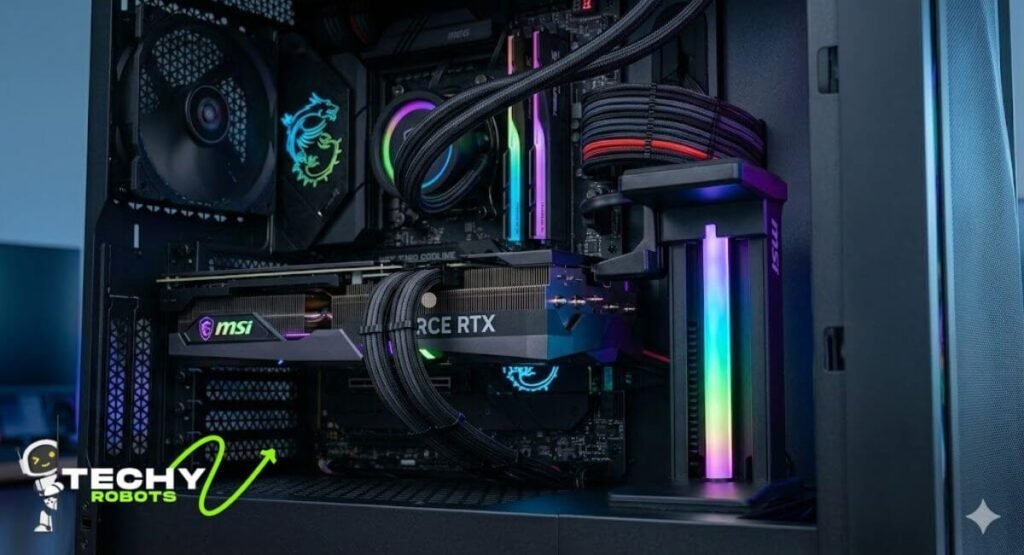
Let’s talk about the part that makes this bolster visually the ARGB ecosystem integration.
MSI Mystic Light Compatibility
The MSI GPU bolster comes with addressable RGB lighting built into the polycarbonate housing. It connects to your motherboard’s 5V 3-pin connector and integrates directly with MSI Mystic Light. Once connected, you can control the lighting from within MSI’s software, choosing from patterns like wave, ripple, spectrum cycle, or static color.
If your whole setup runs MSI components, the synchronization is seamless. Your RAM, motherboard lighting zones, and GPU bolster all pulse together like one cohesive system.
Daisy-Chaining and 5V 3-Pin Connector Support
One of the quieter features worth mentioning is daisy-chaining support. If you’re building out a fully lit setup with multiple ARGB components, the MSI GPU bolster can be linked in a chain, reducing cable clutter inside your case. It also plays nicely with other lighting ecosystems ASUS Aura Sync support and Gigabyte RGB Fusion support are both functional, so you’re not locked into MSI’s ecosystem if you’re running a mixed build.
The dynamic lighting patterns respond in real time and add a genuinely nice touch to any gaming PC aesthetics setup. For a build where RGB synchronization matters, this is a premium detail that budget GPU holders completely skip.
Installation Guide: Setting Up Your MSI GPU Bolster
Getting the MSI GPU bolster installed is straightforward, but a few prep steps make the process much smoother.
What to Check Before You Install
First, make sure you have enough case clearance. The bolster needs floor space directly below your GPU, and if you have a drive bay or cable routing obstruction in that area, you may need to rearrange things. Check for drive bay interference by mapping out the internal layout of your case before you start.
Also check your GPU’s backplate thickness and whether the clamp will clear any component clearance issues on the board. Most modern GPUs with standard backplates will work fine.
Step-by-Step Installation Process
Start by setting the bolster’s height to roughly where you think it needs to be. Place it under the GPU (with your PC lying on its side if needed), then gently lower the GPU onto the clamp until the silicone pads make contact. Let the gas spring do its job; you should feel it pushing back slightly as you seat the card.
Once the GPU is in the PCIe slot and secured with its retention bracket, stand the case upright and check alignment. The bolster should be sitting firmly on the case floor with no wobble. If the height is slightly off, adjust the sliding rail until the GPU sits perfectly parallel to the motherboard. That’s really it. The GPU holder installation takes under five minutes once you’ve done it once.
How It Helps Heavy-Duty GPUs Like the RTX 4090 and RTX 4080
If there’s one use case where the MSI GPU bolster earns its keep, it’s with the current generation of ultra-heavy flagship cards.
Weight Distribution and Center of Gravity
The RTX 4090 in particular has a center of gravity that sits way out toward the front of the case, away from the PCIe slot. This creates a lever effect: the card’s own weight is essentially trying to pry itself out of the motherboard over time. The MSI bolster counters this by providing a support point roughly under the card’s center, redistributing that load more evenly.
For GPU support for heavy cards like these, this kind of weight distribution isn’t optional; it’s genuinely important for keeping your hardware aligned and protected.
Protecting the Backplate and PCB from Bending
PCB bending is a slow, invisible process. You won’t notice it happening, but the cumulative stress from months of unsupported sag can cause the circuit board to develop micro-fractures, especially around the area closest to the PCIe slot.
A GPU support arm that holds the card level prevents this bending entirely. The backplate compatibility of the MSI bolster’s clamp means it won’t scratch or stress the backplate while doing its job. It’s quiet protection that pays off over the life of your build.
Thermal Benefits of Using a GPU Support Bracket
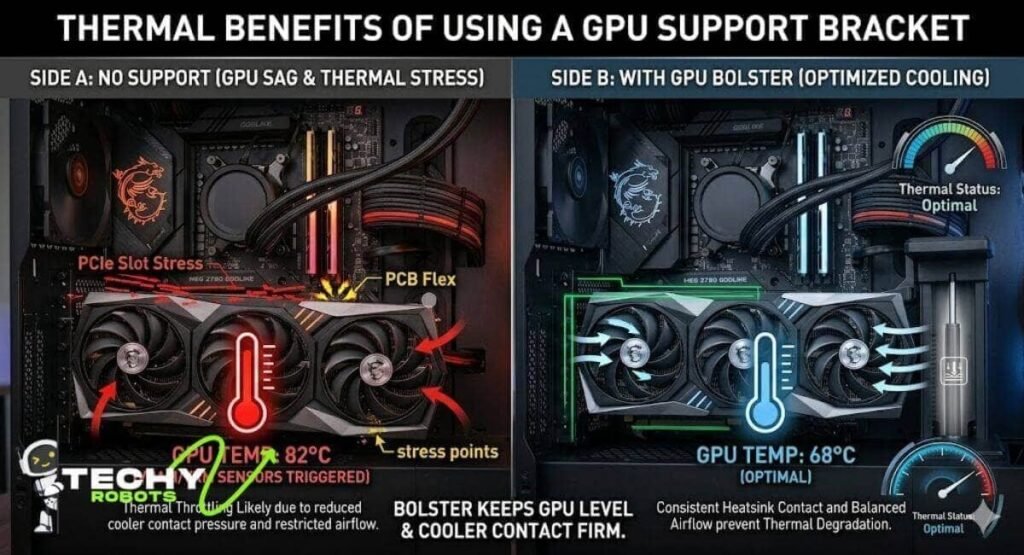
The performance benefits of a GPU support bracket go beyond just physical protection; they have a direct impact on how well your card stays cool.
Consistent Cooler Contact Pressure
A sagging GPU can subtly shift the thermal interface between the die and the heatsink. Even a fraction of a millimeter of movement can reduce cooler contact pressure, which means heat doesn’t transfer as efficiently from the chip to the cooler. This leads to higher operating temperatures over time.
By keeping the GPU perfectly level, the MSI GPU bolster helps maintain consistent cooling pressure across the heat pipe contact points. You may not see a dramatic temperature drop, but you’re preventing gradual thermal degradation that builds up over months.
Airflow Consistency and Thermal Throttling Prevention
There’s another thermal angle worth considering: airflow consistency. A sagging GPU can angle the fans slightly downward, disrupting the designed airflow path through the cooler. Over time, this inefficiency contributes to thermal throttling where the GPU slows itself down to stay within safe temperature limits.
Keeping the GPU level with a GPU stabilization system like the MSI bolster ensures the fans are drawing air exactly as the engineers intended, which means more consistent performance under sustained load.
MSI GPU Bolster vs Other Anti-Sag Solutions
The market has a range of options when it comes to GPU sag prevention, so how does the MSI bolster stack up?
Simple Brackets vs Gas Spring Design
A basic graphics card support bracket from a budget brand will typically run you a few dollars. These are fixed-height metal or plastic rods with a small cradle on top. They work in the sense that they hold the card up but they’re rigid. If your card shifts even slightly, the bracket either stops supporting it or puts uneven pressure on it.
The gas spring GPU support in the MSI bolster is fundamentally different. It adapts. It self-corrects. It applies gentle, consistent force rather than a rigid, static push. For anyone who cares about GPU longevity and long-term hardware health, that difference matters.
Is the MSI Bolster Worth It Over a Generic GPU Holder?
For a mid-range build with a lighter GPU, an affordable bracket might be perfectly fine. But if you’re running a heavy GPU, spending money on quality components, or building a high-end system where everything needs to work reliably for years, the MSI GPU bolster is a better investment. The ARGB lighting, gas spring mechanism, universal compatibility, and build quality put it in a completely different category from basic GPU holders.
Compatibility With Other GPU Brands
One thing worth clarifying: the MSI GPU bolster isn’t just for MSI cards. It works as a universal graphics card bolster for any brand. NVIDIA Founders Edition support is solid, and it handles ASUS ROG GPU support, Gigabyte cards, and AMD reference models equally well.
The clamp adjusts to fit different backplate thicknesses, so whether you’re using an MSI card, a Founders Edition RTX, or a third-party board, the fit should be snug and secure. The ARGB sync works with whatever motherboard ecosystem you’re using, so your lighting setup doesn’t need to change just because you swapped GPUs.
Tips for Getting the Most Out of Your GPU Bolster
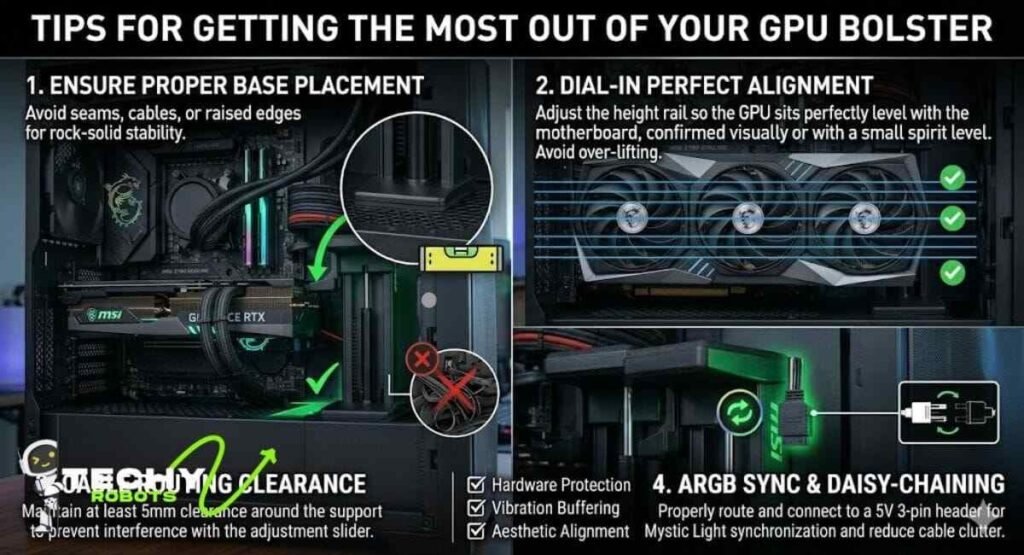
A few practical tips to make sure you’re getting full value from the MSI GPU bolster:
Make sure the rubber base is sitting on a flat surface inside your case. If there’s a seam or raised edge beneath it, the bolster might wobble slightly. Use the height adjustment to align the GPU perfectly level before tightening anything down. Check the alignment a week after installation once everything has settled the gas spring usually finds its final position within the first few days of use.
If you’re routing cables near the bolster, make sure they don’t press against the adjustment slider. Cable routing near the support arm should leave at least a few millimeters of clearance to avoid interference. And if you’re running the ARGB cable, tuck it cleanly along the case wall to keep the build looking tidy.
Conclusion
GPU sag is one of those problems that sneaks up on you. You build your PC, everything looks great, and then a few months later you glance inside and notice that beautiful card starting to droop. The MSI GPU bolster solves that problem better than almost anything else on the market, combining a smart gas spring mechanism, solid build quality, universal compatibility, and great RGB integration into one clean package.
If you’ve invested serious money in a high-end graphics card, protecting that investment with a proper GPU support system just makes sense. The MSI bolster isn’t just an accessory, it’s part of building a PC that performs consistently and lasts.
For anyone building or upgrading a gaming PC with a modern heavyweight GPU, this is one of those purchases you won’t regret.
FAQs
1. Does the MSI GPU bolster work with non-MSI graphics cards?
Yes, it’s a universal GPU support that fits most double and triple-slot graphics cards regardless of brand, including NVIDIA, AMD, ASUS, Gigabyte, and others.
2. Will the gas spring mechanism damage my GPU over time?
No. The gas spring applies gentle, consistent upward pressure that supports the GPU without stressing the backplate or PCB. It’s designed specifically to reduce mechanical strain, not add to it.
3. Can I use the MSI GPU bolster without connecting the ARGB cable?
Absolutely. The ARGB lighting is completely optional. The bolster functions perfectly as a GPU sag prevention tool without any lighting connected.
4. Is the MSI GPU bolster compatible with all PC case sizes?
It works with most standard ATX and mid-tower cases. For smaller ITX or micro-ATX cases, check your case dimensions and GPU position before purchasing, as clearance can be tighter.
5. How do I know if my GPU needs a support bracket?
If you can visibly see your GPU drooping at the far end away from the PCIe slot, or if there’s any flex in the card when you press gently on the front edge, a GPU support bracket is a good idea. Heavy triple-fan cards almost always benefit from one.