If you have ever built a PC with a high-end graphics card, you already know the anxiety that comes with watching that massive GPU slowly droop under its own weight. It’s not a myth. It’s not cosmetic. GPU sag is a real mechanical problem that can quietly wreck your PCIe slot, stress your motherboard, and even mess with your GPU’s cooling performance over time. The MSI Gaming Series Graphics Card Bolster is built to fix exactly that, and it does so with a lot more thought behind it than most people expect.
Let’s move into what this thing actually is, why it works, and whether it’s worth adding to your gaming setup.
What Is a Graphics Card Bolster and Why Does It Matter?

A graphics card bolster is essentially a support stand that sits beneath your GPU inside your PC case and holds it up from below. Think of it like a kickstand for your graphics card. Without one, the weight of modern GPUs, especially the beefy triple-fan monsters, pulls the card downward over time. That constant downward pressure isn’t good for anything in the system.
The Real Problem With Heavy GPUs
Modern graphics cards have gotten massive. Cards like the MSI RTX 5070 Ti or other flagship GPUs from the current generation are not the slim, lightweight boards from a decade ago. Some of these cards weigh well over a kilogram, and they’re only held in place by a PCIe slot and a couple of screws at the back of the case. That’s a lot of stress on a relatively small connector.
Over weeks and months, the card tilts. The PCIe slot bends slightly. The solder points on the card’s PCB start absorbing stress they were never designed to handle. This isn’t just a cosmetic issue with your GPU looking crooked through the side panel. It’s a real durability concern.
How GPU Sag Damages Your Motherboard Over Time
Most people don’t realize how much mechanical stress GPU sag puts on the motherboard. The PCIe x16 slot is a long connector that sticks out horizontally from the board. When a heavy GPU is plugged in and starts to sag, it acts like a lever, pulling the slot downward on one end and stressing the solder joints at the base. Over time, this can lead to intermittent connectivity issues, physical damage to the slot, and in worst cases, actual motherboard damage that’s expensive to fix. A GPU support bracket or bolster like MSI’s solution intervenes before any of that can happen.
Introducing the MSI Gaming Series Graphics Card Bolster
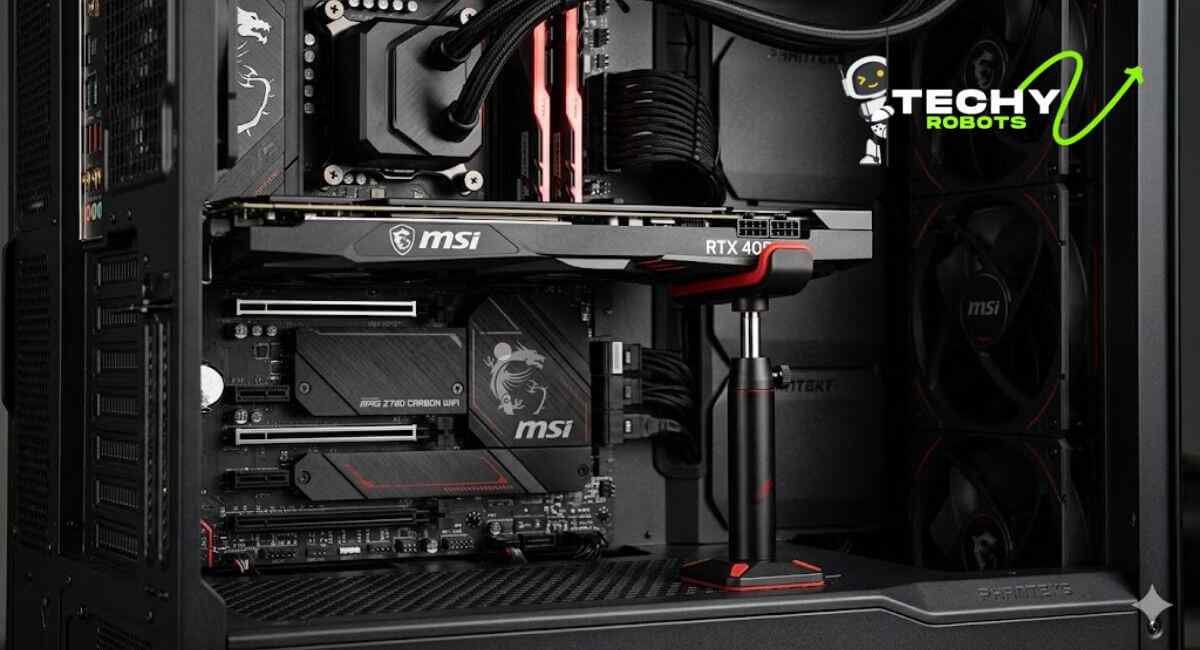
MSI has been making gaming hardware accessories for years, and the Gaming Series Graphics Card Bolster is a product that shows genuine attention to the problems real PC builders face. It’s not just a metal rod you wedge under your GPU. It’s a purpose-built GPU anti-sag stand with a gas spring mechanism, branded MSI aesthetics, and thoughtful engineering throughout.
First Impressions and Build Quality
Right out of the box, the MSI bolster feels substantial. The construction is solid, the red rubber pads are visible and intentional, and the gas spring mechanism feels smooth when you extend or compress it. This is the kind of accessory that feels like it belongs in a gaming rig rather than looking like an afterthought. The MSI Gaming Red color scheme ties it nicely into any build that already uses MSI components.
What Makes It Stand Out From Generic GPU Support Brackets
The market is full of cheap, static GPU support brackets. Most of them are just a fixed-height metal or plastic arm you slide under the card. They work, sort of, but they’re rigid and don’t account for the variety of GPU thickness, case positioning, or the need to actually absorb vibration. The MSI bolster uses a gas spring design that provides dynamic vertical support, meaning it adjusts smoothly to the weight of your specific card and holds it at exactly the right height without you needing to fuss with multiple parts or adapters.
Key Features of the MSI Graphics Card Bolster
This is where it gets interesting. The MSI Gaming Series bolster isn’t complicated to use, but it’s been designed with more features than you’d expect.
Gas Spring Design for Smooth, Adjustable Support
The gas spring is the heart of this product. Instead of a static arm, the bolster uses a compressed gas mechanism, similar in principle to what you’d find in office chair height adjustment or car trunk lifters. This means the support applies a consistent upward force against the underside of your GPU, counteracting its weight smoothly without any hard pressure points. It also means the support adapts to slight movements in the card rather than fighting against them.
Anti-Shock Rubber Base and Red Rubber Pads
The base of the bolster features an anti-shock rubber pad that keeps it firmly in place on the floor of your PC case without sliding around or scratching the surface. The contact points that actually touch the GPU are also cushioned with red rubber pads, which serve double duty. They protect the GPU’s thermal cover and backplate from scratches, and they absorb minor vibrations that can build up during system operation. This vibration buffering is especially valuable if your PC sits on a desk where any surface-level movement could transfer into the system.
Thumbscrew Adjustable Height Mechanism
One of the more practical features is the thumbscrew adjustment. You don’t need any tools to set the height. Just loosen the thumbscrew, extend or compress the support to the right height for your GPU, and tighten it back down. It’s the kind of quality-of-life detail that makes installation fast and frustration-free.
Compressed Height vs Released Height Explained
The MSI bolster has a compressed height of 390 mm and a released height of 680 mm. This range covers a wide variety of PC cases and GPU positions within them. The compressed height is what you’re working with when the card sits lower in the case, and the released height handles taller mid-tower or full-tower cases where the GPU is mounted higher up. This generous range makes it compatible with most modern gaming PC builds without modification.
Dimensions and Compatibility

Does It Fit Your PC Case?
This is the question most people have before buying. With a compressed height of 390 mm and released height of 680 mm, the bolster is designed to fit in both mid-tower and full-tower cases. If your case is particularly compact or features an unusual GPU mounting position, measuring the internal clearance before purchase is a smart move. Most standard ATX cases will have no issue fitting this support stand.
Support Stand Compatibility With Large GPU Models Like the RTX 5070 Ti
The MSI bolster is specifically designed with large, heavy cards in mind. The RTX 5070 Ti is a prime example: it’s a triple-slot, triple-fan behemoth that’s genuinely heavy enough to stress a PCIe slot over time. The gas spring design here handles that kind of weight far better than a static bracket. The support point connects cleanly to the underside of even thick, overbuilt cards without awkward positioning. For oversized GPUs that extend deep into the case, the bolster’s adjustable reach also helps position it correctly under the heaviest point of the card.
How the MSI Bolster Protects Your PCIe Slot
Understanding PCIe Slot Stress and Mechanical Pressure
Think of your PCIe slot as a bridge. It’s strong when weight is distributed evenly, but a heavy GPU hanging off one end creates a moment of force that bends and stresses the bridge over time. The bolster essentially adds a support pillar under that bridge. By taking weight off the slot entirely, it eliminates the downward force that causes the slot to flex, which is what leads to long-term PCIe slot reinforcement issues becoming actual hardware failures.
Long-Term Motherboard Structural Integrity
Beyond the slot itself, the motherboard traces and layers around the PCIe connector are at risk when GPU sag goes unchecked. High-end motherboards are expensive, and while they’re robust, they aren’t designed to handle years of constant gravitational stress from a 1.5 kg graphics card. Using a GPU stabilizer like the MSI bolster is genuinely a form of motherboard damage prevention, not just cosmetic tidiness.
Installation Guide: Setting Up Your MSI GPU Support Stand
Step-by-Step Installation Process
Installing the MSI bolster is simple enough that you won’t need to watch a tutorial, but here’s a clear walkthrough anyway.
First, install your graphics card into the PCIe slot normally and secure it at the rear bracket. Then, with the GPU installed and the system powered off, slide the bolster into the case and position it underneath the GPU, roughly centered beneath the heaviest part of the card, which is usually near the cooler fans. Extend the support using the thumbscrew until the rubber pad just makes contact with the underside of the GPU’s thermal cover. You’re not trying to lift the card, just support it at its natural resting position. Tighten the thumbscrew, and you’re done.
Tips for Getting the Right Height Adjustment
Don’t overtighten the support against the card. The goal is to counteract sag, not to push the card upward. If you push it up too much, you’re just introducing stress in the opposite direction. Find the height where the GPU sits naturally level, make contact with light pressure, and lock it there. The gas spring handles the rest.
MSI Bolster for GPU Transport Safety
Anti-Vibration Protection During Transport
One underrated use case for the MSI bolster is transport protection. If you take your PC to LAN events, move it between rooms, or just want peace of mind when relocating your rig, the bolster can remain installed to keep your GPU from bouncing around during movement. The rubber base grips the case floor, the rubber pads cushion the GPU contact point, and the gas spring absorbs the shock from bumps and vibrations that would otherwise transmit directly into the PCIe slot.
Why It Works as a Graphics Card Stabilizer on the Move
Standard GPU support brackets often become a liability during transport because they’re static and rigid. A bump that pushes the case can cause a hard bracket to lever against the card rather than absorb the movement. The gas spring mechanism in the MSI bolster behaves differently. It compresses slightly under impact, absorbs the force, and releases it gradually, acting much more like a shock absorber than a rigid prop. That makes it genuinely useful as a graphics card transport safety tool, not just something you install and forget.
Aesthetic Appeal: Does It Look Good in Your Gaming Setup?
MSI Gaming Red Design Language
MSI knows their audience. The bolster uses the same Gaming Red color scheme that runs through MSI’s lineup of motherboards, GPUs, and peripherals. The red rubber pads aren’t just functional, they’re deliberate branding that ties the accessory into the larger MSI ecosystem. If your build already uses an MSI motherboard or GPU, this support stand looks like it belongs there rather than being a random third-party addition.
Matching Your Gaming Rig’s Visual Theme
Even if your build isn’t fully MSI-themed, the red-and-black color combination is versatile enough to work in most gaming PC setups. It’s not neon or aggressive, just clean and purposeful. Through a tempered glass side panel, the bolster looks like a thoughtful addition rather than a workaround.
MSI Gaming Series Bolster vs Other GPU Anti-Sag Solutions
Comparison With Basic GPU Support Brackets
Generic GPU support brackets are fine for light or mid-weight cards, but they often fall short with heavy, modern GPUs. They’re usually fixed height, meaning you need the exact right size for your card’s position, and they have no give if the card shifts even slightly. The MSI bolster’s adjustable height and gas spring mechanism make it a much more flexible and forgiving solution. It’s also much better built than the typical aluminum arms you find for a few dollars.
Why Gas Spring Wins Over Static Braces
A static brace can only support the card at a single fixed height. If your card has any natural flex or thermal expansion that causes it to shift slightly during use, a rigid brace either loses contact entirely or creates a hard pressure point. The gas spring maintains consistent contact pressure across a range of positions, making it a genuinely superior GPU support mechanism for heavy, modern graphics cards.
Who Should Buy the MSI Gaming Series Graphics Card Bolster?
If you’re running a large, heavy GPU, especially anything in the RTX 4000 or 5000 series, or AMD’s RX 7000 lineup, this bolster is worth it. It’s also a smart buy if you transport your PC regularly, if your case has a tempered glass panel where you care about GPU alignment looking clean, or if you’ve already had a PCIe slot issue caused by GPU sag and never want to deal with that again.
It’s also a great match for anyone building an MSI-themed rig who wants the entire build to feel cohesive. The bolster fits right in visually and functionally.
Common Questions and Concerns
What If the Support Stand Seems Too Short?
If the bolster seems too short for your setup, the first thing to check is whether you’ve fully released the gas spring extension. The released height of 680 mm covers most standard builds, but in unusually tall full-tower cases with high GPU mounting positions, you may need to measure beforehand. If you’re still coming up short after full extension, MSI’s support channels can advise on whether a longer variant or an extension is available.
Case Height Compatibility Concerns
The 390 mm compressed height means the bolster needs at least that much vertical clearance from the bottom of your case to the underside of the GPU. In most standard mid-tower and full-tower cases, this is not an issue, but in compact or ITX-adjacent cases, it’s worth checking your internal case dimensions before purchasing.
Conclusion
GPU sag is one of those problems that builds quietly in the background until it causes real damage, and by then, it’s already cost you. The MSI Gaming Series Graphics Card Bolster solves it cleanly, without drama, and without looking out of place in a serious gaming build. The gas spring design, the anti-vibration rubber pads, the thumbscrew height adjustment, and the wide compatibility range all come together in something that feels genuinely well thought out.
It’s a small investment compared to the cost of a damaged motherboard or a bent PCIe slot. If you’re running a heavy, modern GPU, getting one of these under your card before the sag sets in is just good hardware hygiene. Your rig will look better, run more reliably, and survive transport without you having to hold your breath every time you move the case.
For anyone serious about their gaming setup and the hardware inside it, the MSI bolster is the kind of accessory that earns its place quickly and stays there for the life of the build.
FAQs
1. Is the MSI Gaming Series Graphics Card Bolster compatible with all GPU brands, or only MSI cards?
The bolster works with any graphics card regardless of brand. It supports the underside of the GPU using rubber pads, so as long as your card fits within the height range and the support can reach, it will work fine with NVIDIA, AMD, or any other brand of graphics card.
2. Can I leave the bolster installed permanently, or is it only for transport?
It’s designed for permanent installation inside your case. The anti-shock rubber base keeps it stable during regular use, and the gas spring provides consistent support around the clock. Leaving it installed permanently is the recommended use case.
3. Will the rubber pads scratch or damage the GPU’s backplate or thermal cover?
No. The rubber pads are specifically designed to make contact with the card without causing any surface damage. They’re soft, non-abrasive, and provide a cushioned interface between the support stand and the GPU.
4. Does the height adjustment work for both single-slot and triple-slot graphics cards?
Yes. The thumbscrew height adjustment is continuous, not stepped, so you can dial in the exact height needed whether your card is slim or thick. The rubber contact pad is wide enough to make solid contact with cards of various thicknesses.
5. Does the MSI bolster interfere with GPU cooling or airflow inside the case?
No. The bolster contacts the underside of the GPU, which is typically the backplate or thermal cover, and does not block any intake fans or exhaust vents. In some builds, having the GPU properly supported and level can actually improve airflow consistency since the card sits in the position it was designed to occupy.